
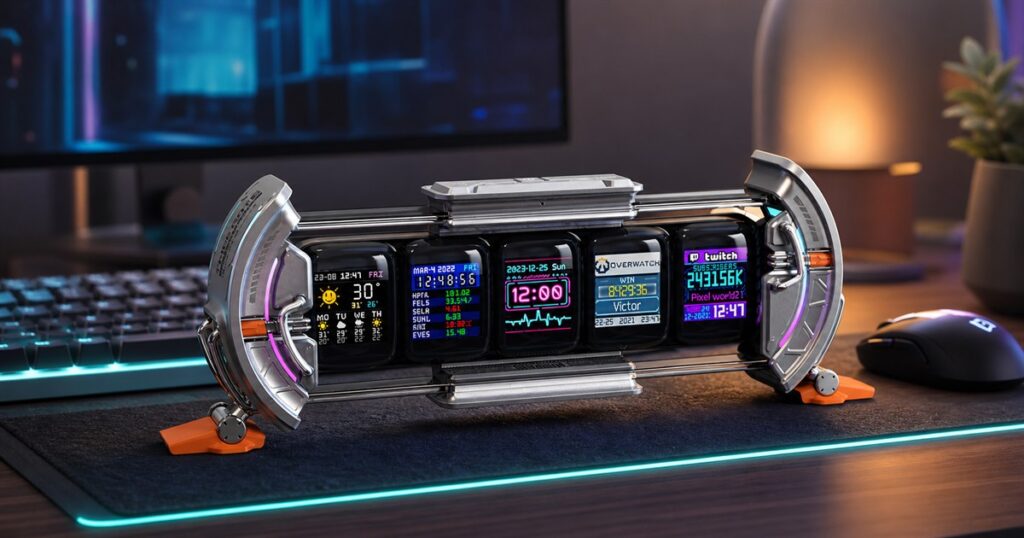
This Five-Screen Pixel Art Desk Dashboard Turns Your Workspace Into A Tiny Mission Control
Every desk has a natural life cycle. First it is clean, then it gets a coffee mug, then suddenly it has three charging cables, a rogue receipt, a sticky note with one terrifying word on it, and a vague feeling that NASA could use the place if everyone agreed to stop touching the crumbs.
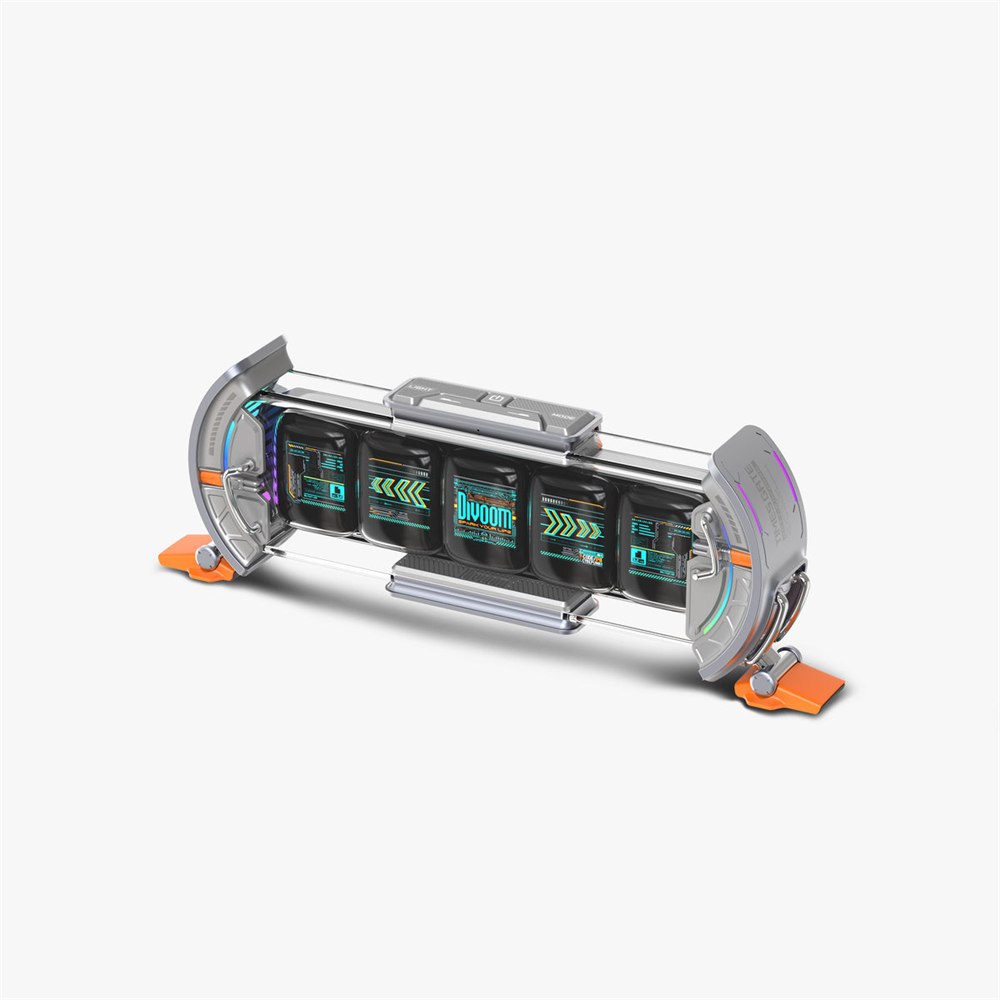
The Divoom Times Gate leans directly into that problem by asking a bold question: what if the clutter was not paper, but five glowing little screens pretending your work-from-home corner is a cyberpunk bridge crew station? It is a compact pixel art info display with five full-color LCD screens arranged in a futuristic frame, giving your desk clocks, weather, countdowns, tiny animations, social stats, stock or crypto-style dashboards, and whatever pixel art your personality can survive.
This is not a normal alarm clock. It is not a full monitor. It is not the productivity device your boss buys in a bulk pack and tells everyone is “for focus.” The Times Gate is a desk object for people who enjoy glanceable information, RGB atmosphere, and the strange emotional comfort of seeing five tiny panels doing little jobs at the same time.
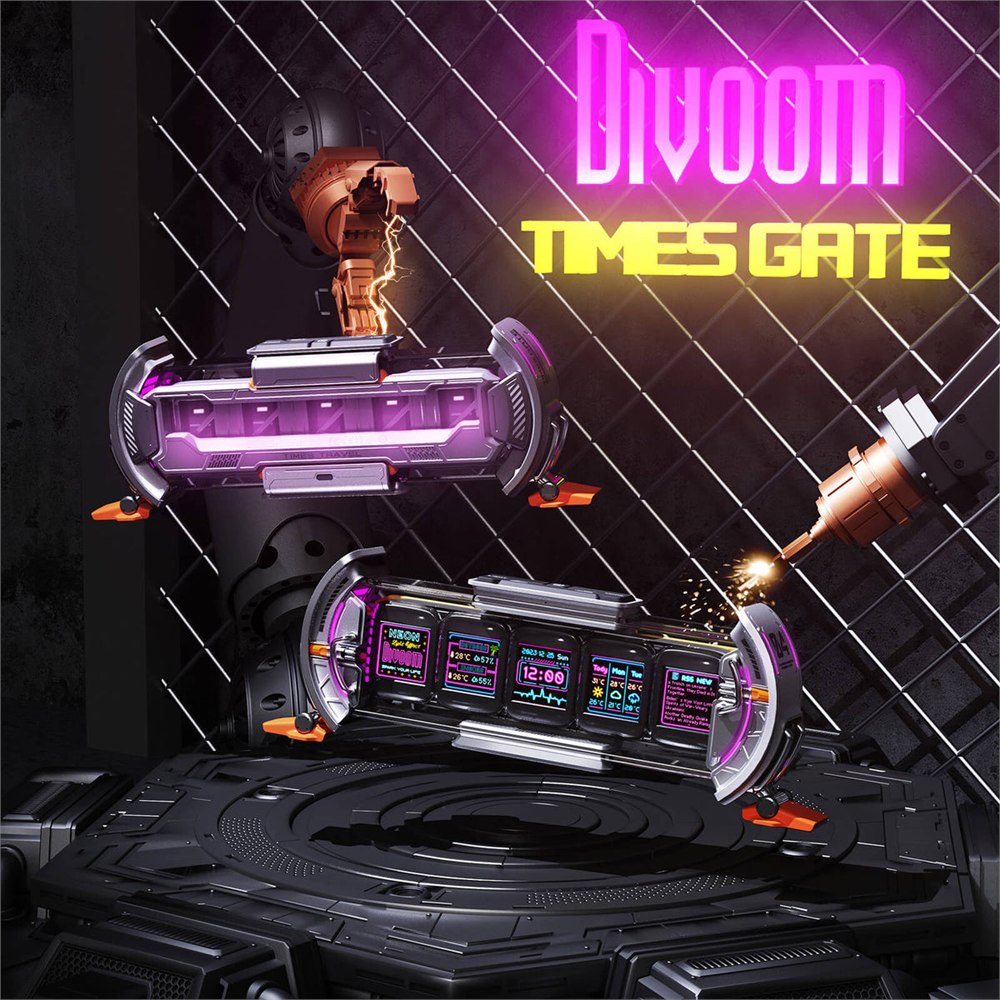
Divoom lists each of the five displays as a 128 by 128 full-color LCD screen, which is an important detail because the whole charm of the thing lives in that miniature square format. Each panel can become its own little world: a clock, a pixel scene, a weather tile, a follower counter, a market widget, a calendar, a game stat display, or a custom animation from the Divoom app. It is basically a row of tiny office interns, except they are colorful, silent, and much less likely to schedule a meeting called “quick sync.”
The hardware has the shape of a little sci-fi gate, with side pieces, feet, and a horizontal body that looks more like something pulled from a spaceship console than a bedroom nightstand. The silver version on Amazon has the cleanest “tiny command center” energy, while Divoom also shows other colorways for people whose desk aesthetic is less starship engineer and more pastel streaming cave.
Related posts:
 These Power Screens Automatically Screen-In Your Patio With The Push of a Button
 People Are Making Barn Door Baby Gates, Window Shutters, and TV Covers, and They Look Amazing
 This Unique Front Door Dog Gate Prevents Your Pooch From Escaping When You Answer Door
 This Smart Pixel Mug Turns Coffee Breaks Into Tiny 8-Bit Chaos

Five Screens, One Desk, Many Tiny Responsibilities
The main appeal is separation. A single small smart display can show one thing well, but the Times Gate spreads the job across five panels, so the clock does not have to fight the weather, your pixel cat does not have to shove aside a countdown timer, and your imaginary stock dashboard can have a little dignity.
That makes it especially good for the kind of person who wants a desk to feel alive without adding a second full-size monitor. The Times Gate is more atmosphere than workstation, but it can still be useful in small doses. A world clock on one screen, a weather tile on another, a countdown in the middle, and some custom pixel art on the ends is a reasonable little setup. Add social stats or market widgets and suddenly your desk looks like it knows things you do not.
- Use one screen as a readable clock and another for weather or calendar glances.
- Fill the remaining panels with pixel art, animated GIFs, countdowns, or app-supported widgets.
- Set it behind a keyboard, under a monitor, or on a shelf where the five-screen shape can actually be seen.
- Keep layouts simple if you sit farther away, because tiny screens punish overconfidence.
- Use the RGB side lighting as desk ambience instead of turning the whole room into a nightclub for cables.
The Divoom Smart App is the control center, which means the product is only as fun as your willingness to poke through layouts, widgets, and pixel art options. Divoom says the app lets users create and display custom pixel art, choose community designs, and manage information screens. This is the part where the Times Gate becomes either a delightful desk toy or a tiny software hobby, depending on your patience for customization.

What It Actually Does
Divoom describes the Times Gate as a smart desk display for live stats, clocks, weather, calendar items, crypto tickers, social counters, and custom pixel animations. The product page also says it uses 2.4 GHz Wi-Fi for setup, control, and real-time data syncing. That matters because this is not a Bluetooth speaker wearing a costume. It is a plugged-in desk display that expects a stable connection and a phone app.
| Feature | What It Means On A Desk | Practical Note |
|---|---|---|
| Five 128 x 128 LCD screens | Separate tiny panels for clocks, widgets, stats, or art | Great for visual variety, less ideal for dense text |
| Divoom app control | Customize faces, animations, and supported widgets | Best for people who like tweaking their setup |
| 2.4 GHz Wi-Fi | Handles setup and connected information features | Not a Bluetooth-only accessory |
| Continuous power | Designed to stay plugged in on a desk | No built-in battery for portable use |
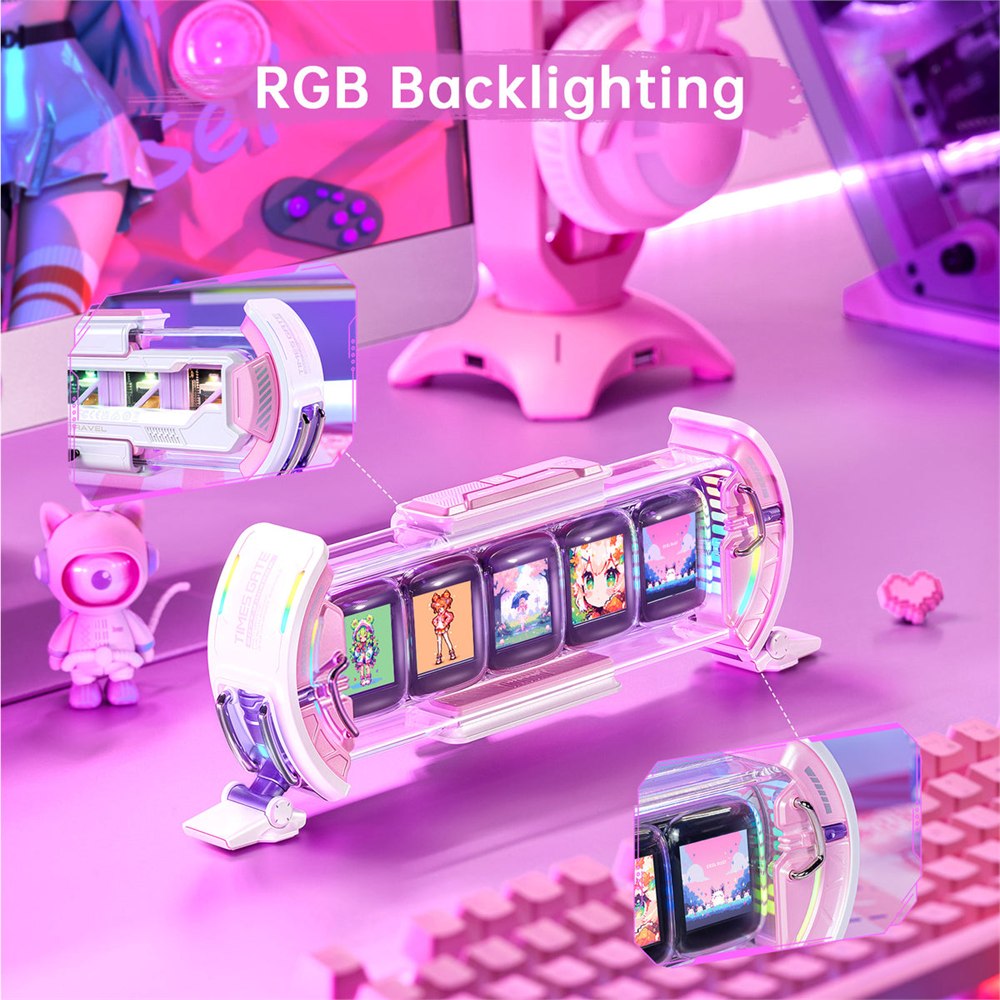
| RGB ambient lighting | Adds side glow and gaming-room atmosphere | Works best as an accent, not the whole personality |
The listed product size is 283 by 47 by 97 mm, which puts it in the “noticeable but not furniture” category. It is wide enough to feel like a real desk feature, but small enough to sit under a monitor or next to speakers without demanding its own lease agreement. For a gaming setup, streaming background, home office, or maker desk, that size makes sense.
The biggest mental adjustment is understanding that the Times Gate is not trying to replace anything serious. It will not replace a monitor, a weather station, a phone, a calendar, or a productivity app. It replaces the boring empty stretch of desk where your eyes go when you are avoiding a spreadsheet. In that role, it is almost aggressively qualified.
The Pixel Art Part Is The Point
Pixel art is not just a decorative extra here. It is the language of the product. Divoom has built much of its gadget universe around small display squares, retro-style visuals, and community-created animations. The Times Gate takes that idea and multiplies it by five, so your desk can have a row of tiny animated signs instead of one lonely screen trying to carry the entire aesthetic burden.
That also means restraint helps. A Times Gate loaded with five frantic animations can look like a casino arguing with a motherboard. A Times Gate with two useful widgets, one clock, and two calm visual panels looks intentional. This is the rare desk gadget where taste is an actual feature, and unfortunately the app cannot install that for us.
The device makes the most sense for gamers, streamers, content creators, pixel art collectors, people with carefully built desk setups, and anyone who wants a gift that feels more surprising than another wireless charger. It is also a good fit for people who enjoy “ambient information,” the polite term for data you glance at while pretending you did not just lose fourteen minutes choosing a wallpaper.

There are limits worth knowing before you let your desk start glowing with authority. Because the Times Gate needs continuous power, it is not something you carry around the house like a tablet. Because the screens are small, it rewards high-contrast layouts and punishes microscopic dashboards. Because some features depend on app support and connected services, the most durable use cases are clocks, pixel art, weather, countdowns, and simple glanceable widgets rather than mission-critical tracking.
Who This Makes Sense For
The Times Gate is for the person who already understands why a desk can be a hobby. If you have never adjusted a monitor light bar, chosen a keyboard because it sounded like rain on a spaceship, or cared whether your desk mat matches your mouse, this may seem wonderfully unnecessary. If you have done any of those things, the Times Gate is exactly the kind of unnecessary that starts looking suspiciously useful.
It is also a clever gift because it is specific without being too niche. A five-screen pixel dashboard says, “I know you like gadgets,” but it does not require knowing someone’s shirt size, coffee grinder preference, or deeply personal cable-management shame. It works as decor, a clock, a widget display, and a conversation piece.
Divoom sells the Times Gate directly, and the product is also available through the Amazon listing for the silver unit. The Amazon product page listed it at $129.99 during this write-up, while Divoom’s own page showed the Times Gate as in stock at $139.99. Amazon pricing can move around, so the final checkout page gets the last word, as usual, because retail has decided certainty is a seasonal product.
- Product: Divoom Times Gate five-screen pixel art info display
- Core function: desk dashboard for clocks, widgets, stats, weather, and pixel animations
- Displays: five 128 x 128 full-color LCD screens
- Connection: 2.4 GHz Wi-Fi through the Divoom app
- Power: continuous plugged-in power, not battery portable
- Listed size: 283 x 47 x 97 mm
- Best for: gaming desks, creator setups, home offices, pixel art fans, and gadget gifts
- Product URL used here: Amazon listing for the silver Times Gate
So no, the Divoom Times Gate is not going to rescue your productivity, organize your files, or politely ask your inbox to calm down. But it will make your desk look like a tiny futuristic control room where at least five little screens appear to be taking life seriously. Sometimes that is enough. Sometimes that is the whole job.
| Pros | Cons |
|---|---|
| Five separate screens make the display feel more dynamic than a normal clock | Small panels are not ideal for dense information or long text |
| Pixel art, widgets, and RGB lighting give it strong desk personality | Requires app setup and ongoing customization to get the best look |
| Useful for clocks, weather, countdowns, simple stats, and ambient info | Needs continuous power and is not portable |
| Compact enough for gaming desks, shelves, and home offices | Connected widgets may depend on supported services and firmware |
| Works well as a gadget gift for creators and tech fans | People who want pure utility may find it more decorative than essential |
Where to find This Five-Screen Pixel Art Desk Dashboard Turns Your Workspace Into A Tiny Mission Control
OddityMall may earn a commission from qualifying purchases at no extra cost to you.
Related posts:
These Power Screens Automatically Screen-In Your Patio With The Push of a Button
People Are Making Barn Door Baby Gates, Window Shutters, and TV Covers, and They Look Amazing
This Unique Front Door Dog Gate Prevents Your Pooch From Escaping When You Answer Door
This Smart Pixel Mug Turns Coffee Breaks Into Tiny 8-Bit Chaos
