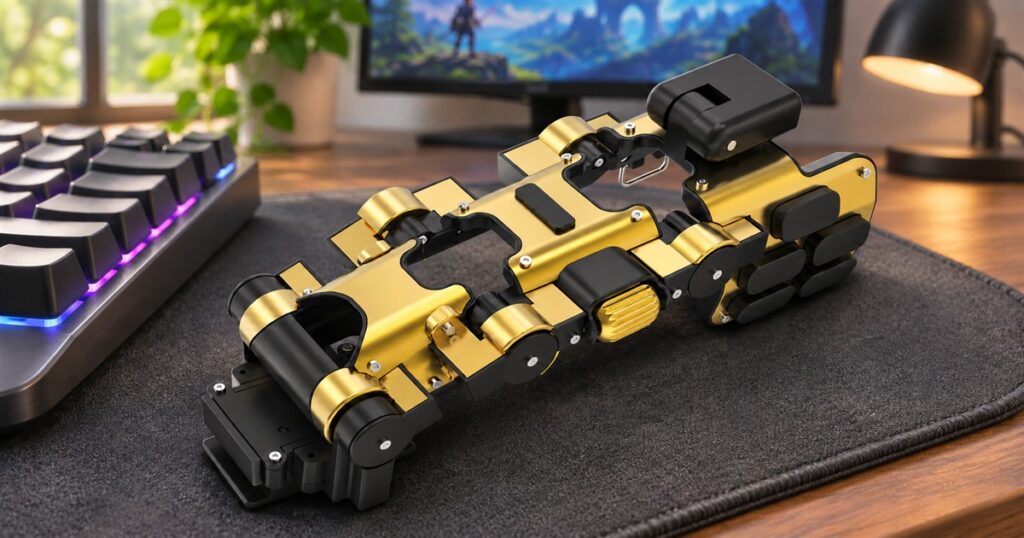
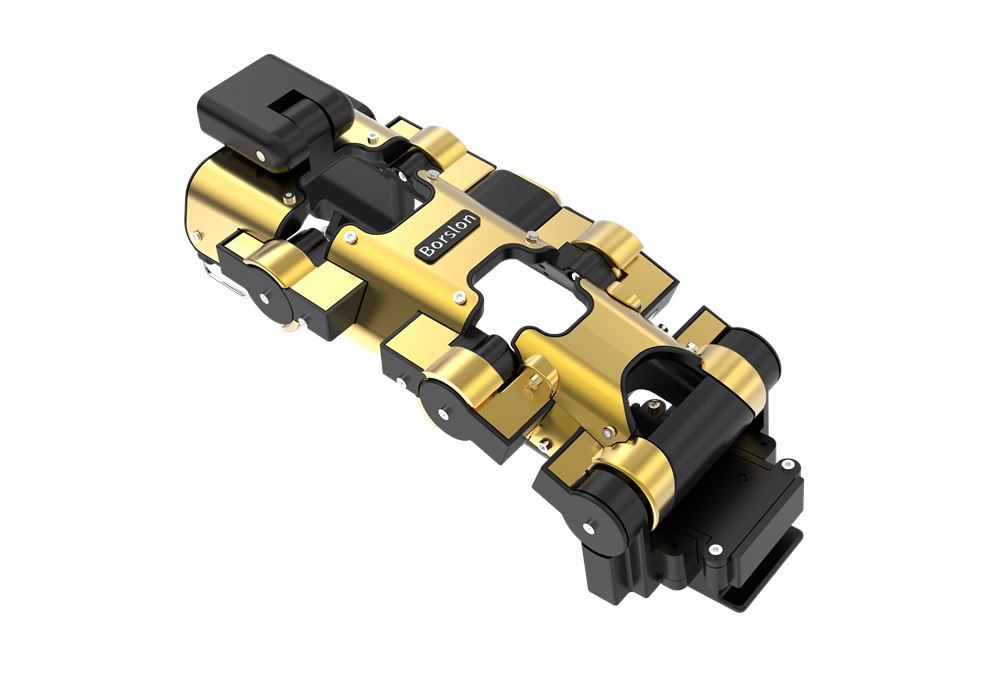
Your index finger has spent years pointing at things while the rest of your hand did the paperwork. BORSLON would like to change that arrangement. This finger-worn gaming mouse gives one digit an articulated gold-and-black frame, a cursor-control job, and the general appearance of someone who arrived at game night wearing a very small exoskeleton.
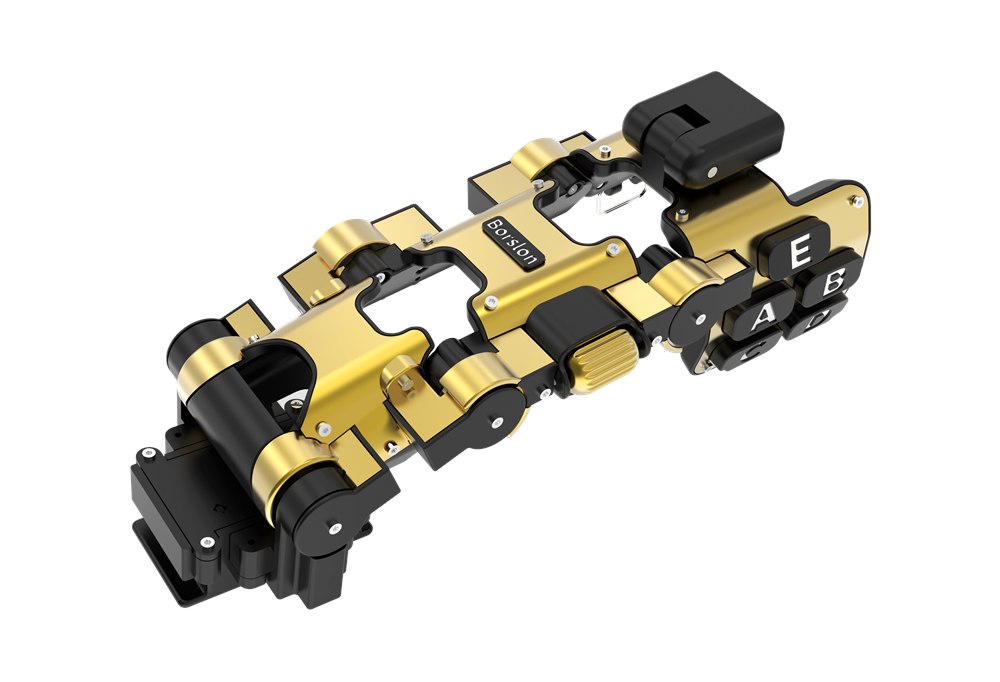
The idea is straightforward, even if the hardware looks like it belongs in a drawer marked experimental. Instead of gripping a conventional mouse, you wear BORSLON on your right hand and move your finger across a compatible surface to steer the pointer. A cluster of programmable buttons and an optical scroll wheel provide the other half of the conversation.
There is an important distinction here: this is a Kickstarter hardware project at the prototype and development stage. It is an unusual approach to controlling a computer, with specifications supplied by its maker. It is not a finished retail mouse that has already proved it can replace everyone’s favorite desk companion. The curiosity is real; the final verdict will have to wait.
A mouse that follows your finger
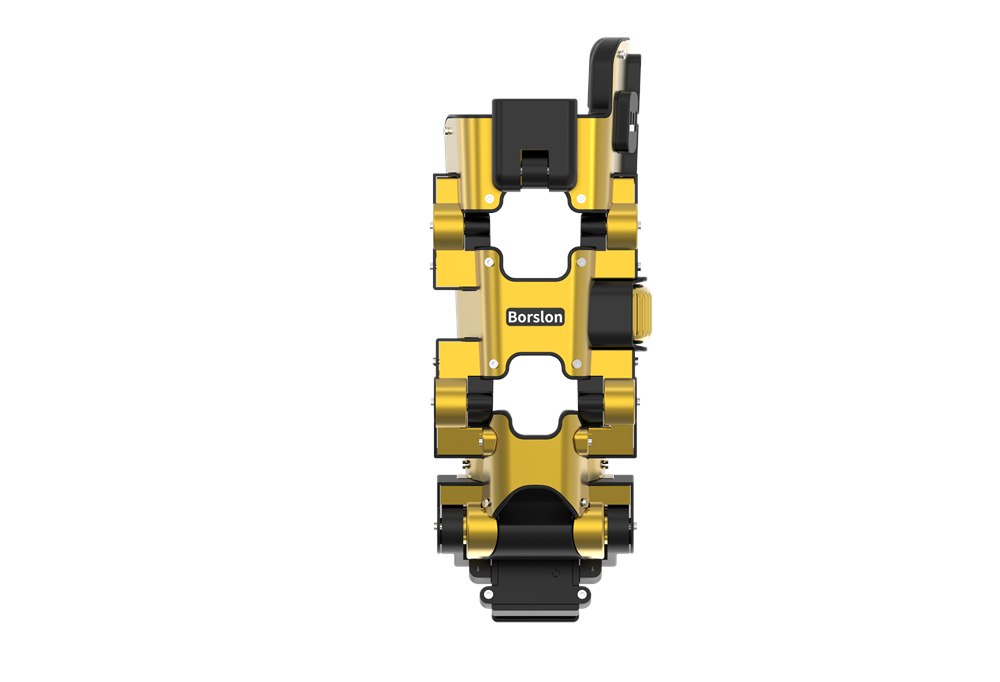
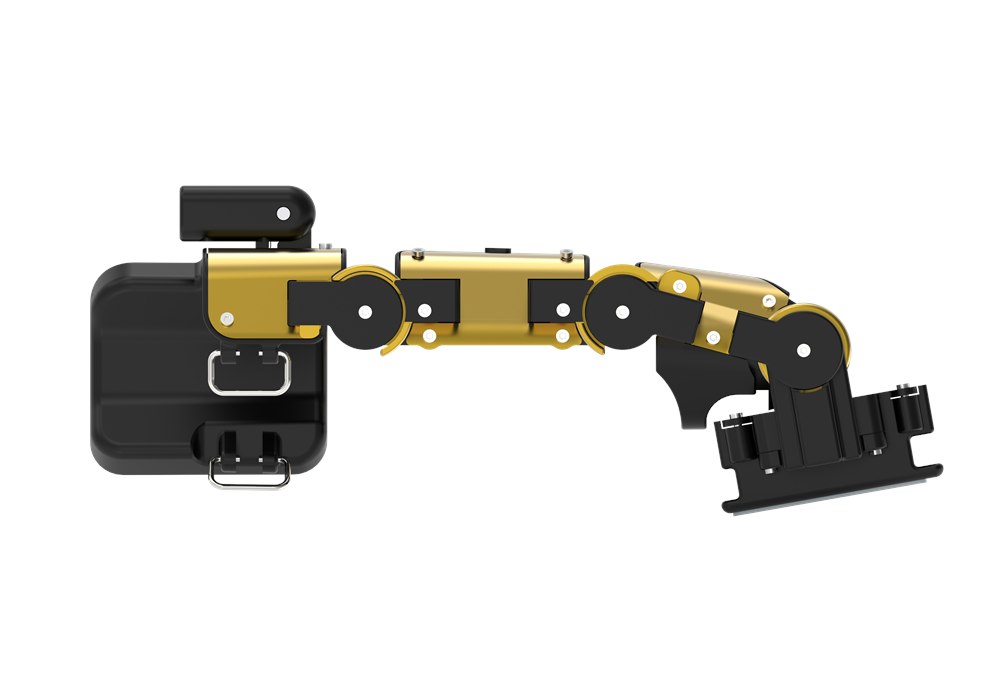
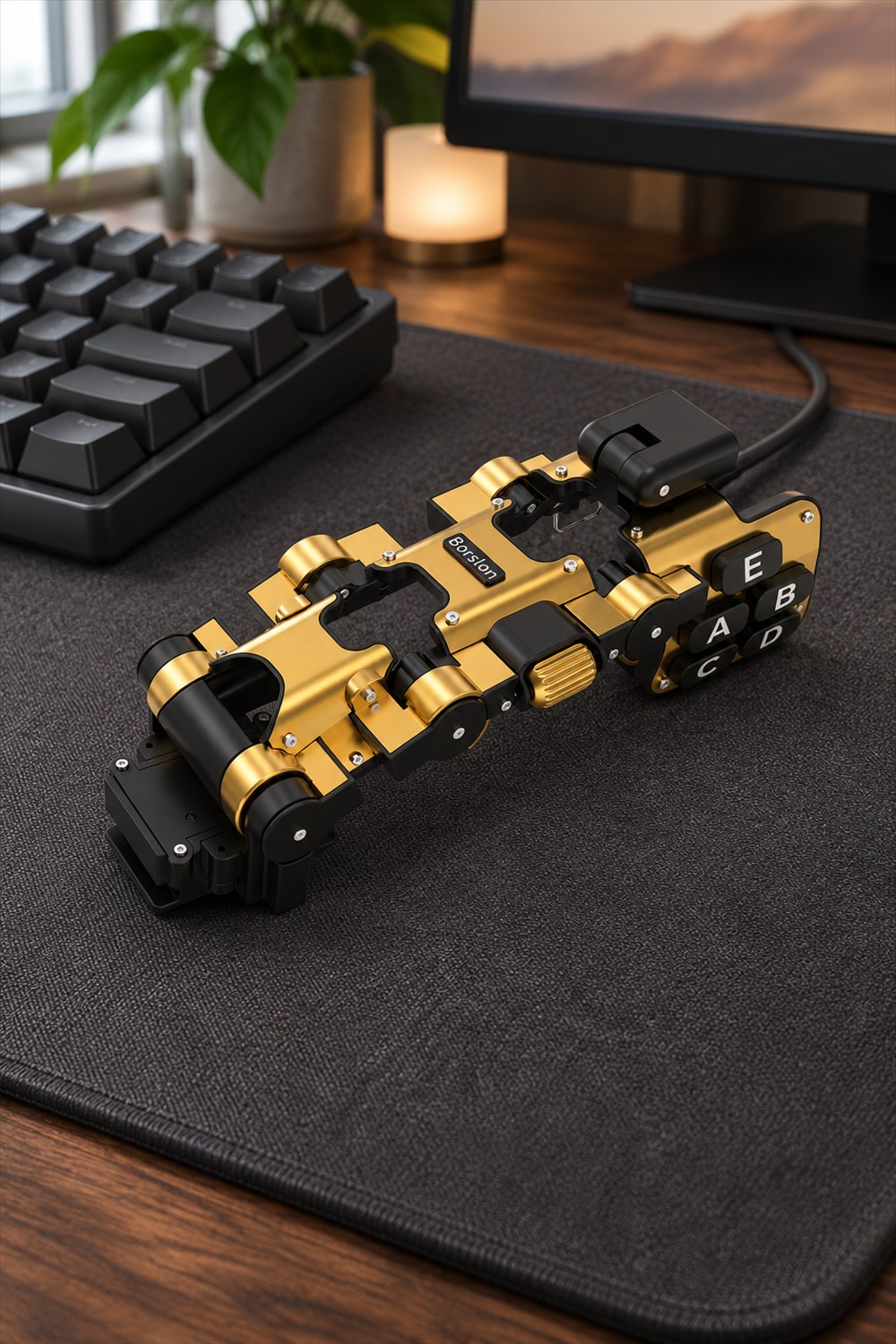
BORSLON’s articulated structure is designed to follow the movement of a finger. The gold-colored sections, dark joints, exposed fasteners, and compact controls make it look more mechanical than most things used to close browser tabs. You could leave it beside a keyboard and reasonably expect someone to ask which part of the robot fell off.
Its actual job is less dramatic. With the base resting on an appropriate surface, finger motion translates into cursor movement. That surface contact matters: wearing a mouse does not turn it into an air pointer. Waving at the monitor like a wizard having a disagreement with a spreadsheet is not the intended control method.
The maker pitches this arrangement as a way to keep the hand available for keyboard use. Whether that feels natural will depend on the person, the fit, and the tasks involved. A familiar mouse has years of muscle memory on its side. BORSLON has the advantage of looking like it escaped from an engineering student’s most interesting drawer.
The thumb gets a control panel
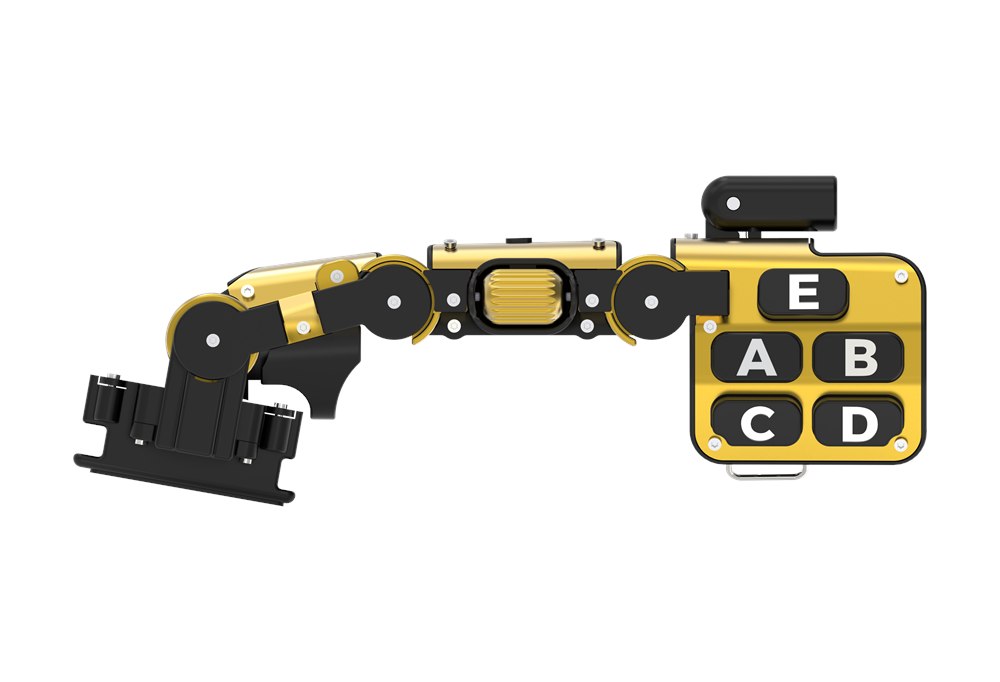
Five programmable buttons sit alongside an optical scroll wheel. Those buttons can receive supported functions through configuration software, including right-click. Their placement changes the relationship between movement and clicking: instead of settling two fingers on the usual broad mouse buttons, you learn where the wearable’s controls sit relative to your hand.
That is the part worth thinking about before getting distracted by the gold hinges. A mouse can have impressive electronics and still feel unfamiliar because the controls are somewhere new. Reaching the correct button without disturbing cursor position is an interaction question, and a row of specifications cannot answer it for every hand.
The settings interface is browser-based, according to the campaign. That is where supported button functions and settings can be customized. The maker says detailed setup instructions will accompany the product, so buyers should leave room for the software experience to evolve alongside the hardware.
- Finger-driven movement: the base moves across a compatible surface to control the cursor.
- Five programmable buttons: supported assignments include mouse functions such as right-click.
- Optical scroll wheel: scrolling remains part of the physical control layout.
- Browser-based configuration: settings and button functions are adjusted through the maker’s software.
- Wired USB connection: this campaign covers the wired version.
Gaming specifications, unusual packaging
The campaign identifies a PAW3395 optical sensor and advertises sensitivity up to 26,000 DPI, along with an 8,000 Hz polling rate. Those are the headline numbers attached to a product that has very clearly refused to look like the rest of the mouse aisle.
They describe the intended electronics, not a guarantee that a different grip will improve anyone’s aim. The campaign itself notes that actual performance depends on the computer and setup. Your preferred sensitivity, how you move, and how easily you reach the buttons still matter. Buying a golden finger apparatus does not automatically turn a missed shot into a hardware problem.
The more interesting question is whether separating cursor movement into this wearable arrangement feels useful. Some people enjoy experimenting with unusual input devices; others want their mouse to disappear into the background of a task. BORSLON seems most appealing to the former group, particularly anyone who regards learning a new control scheme as part of the fun.
| Detail | What BORSLON currently specifies |
|---|---|
| Product type | Articulated finger-worn gaming mouse |
| Hand orientation | Right-hand design with a fixed button layout |
| Connection | Wired USB |
| Sensor | PAW3395 optical sensor |
| Maximum sensitivity | Up to 26,000 DPI, as advertised |
| Polling rate | Up to 8,000 Hz, as advertised |
| Controls | Five programmable buttons and optical scroll wheel |
Right-handed, wired, and still being developed
The current version is designed for right-handed users. Its button layout is fixed, and the maker says a left-handed version would be something to consider after the current product reaches mass production, depending on interest. Lefties should therefore treat a future version as a possibility rather than something included in this campaign.
It is also wired. There is no wireless version in the present project, so the tiny exoskeleton comes with a thoroughly ordinary tether to the computer. That is useful to know if your desk setup depends on moving freely between devices or if your entire cable-management strategy is pretending cables have moved out.
Fit and comfort are another area where expectations should stay practical. An articulated shape is a design feature; it is not proof that every hand will find it comfortable for long sessions. There is no need to turn a distinctive computer accessory into a medical claim. What matters is how it fits, how the controls feel, and whether the movement suits the user.
Because the project is still in development, final hardware, instructions, and production timing deserve attention. The campaign says backing will help it move toward production. That places BORSLON in the category of an interesting product to follow or support with eyes open, rather than a guaranteed replacement needed for tomorrow morning’s deadline.
Who might actually want this?
The obvious audience is the input-device experimenter: the person who has opinions about button placement, keeps old controllers in a box, and thinks a new way to move a cursor sounds like a pleasant weekend. BORSLON offers a substantially different physical arrangement, which is a more compelling reason to investigate it than the color of its metalwork.
It may also appeal to gamers who enjoy tuning controls around their habits. Programmable buttons give them something to configure, while the finger-based movement gives them something new to learn. Neither guarantees better results. Sometimes an unusual peripheral earns its place because using it is interesting, and that is a perfectly respectable reason to be curious.
For a person who needs a familiar, immediately available mouse, the prototype status is the bigger consideration. Novelty can be entertaining, but waiting on hardware development is a different activity from opening a retail box. One involves a shipping label; the other can involve updates about tooling. They should not be mistaken for the same shopping experience.
The details before your finger applies for the job
- BORSLON is a right-handed, articulated mouse worn on the fingers.
- Cursor control requires moving its base on a compatible surface.
- Five programmable buttons and an optical scroll wheel provide physical controls.
- The current campaign is for a wired USB model, with browser-based configuration.
- The maker advertises a PAW3395 sensor, up to 26,000 DPI, and 8,000 Hz polling.
- The project remains at the prototype and development stage; production and delivery can change.
Kickstarter pledges have been listed from $99, compared with a planned retail price of $158, with shipping charged separately. Reward availability and delivery estimates should be checked on the campaign before backing. Crowdfunding supports development and does not guarantee delivery on a particular date.
Product details and images: BORSLON; campaign information and current rewards: Kickstarter. Your index finger may be ready for its promotion, but it should probably read the job description first.
| Pros | Cons |
|---|---|
| Distinctive finger-driven cursor control | Unfamiliar movement and button placement may require practice |
| Five programmable buttons and a scroll wheel | Current fixed layout is for right-handed users |
| Browser-based settings interface | Final setup experience remains part of development |
| Articulated gold-and-black mechanical design | Fit and long-session comfort will vary by user |
| Wired USB model avoids battery charging | No wireless version is included in this campaign |
| Interesting alternative for input-device enthusiasts | Prototype crowdfunding project with uncertain production timing |
Save this find.
Thank yourself later.
Your next great gift idea. Your someday space. Your collection of wonderfully weird things.
Save to PinterestPick a board. Keep the inspiration.
This Finger-Worn Gaming Mouse Puts Cursor Control on Your Index Finger
At a glance
Product snapshot
- Listed price
- $99Prices and availability can change. Check the seller for current details.
- Where to find it
- Kickstarter
- Category
- Gadgets