
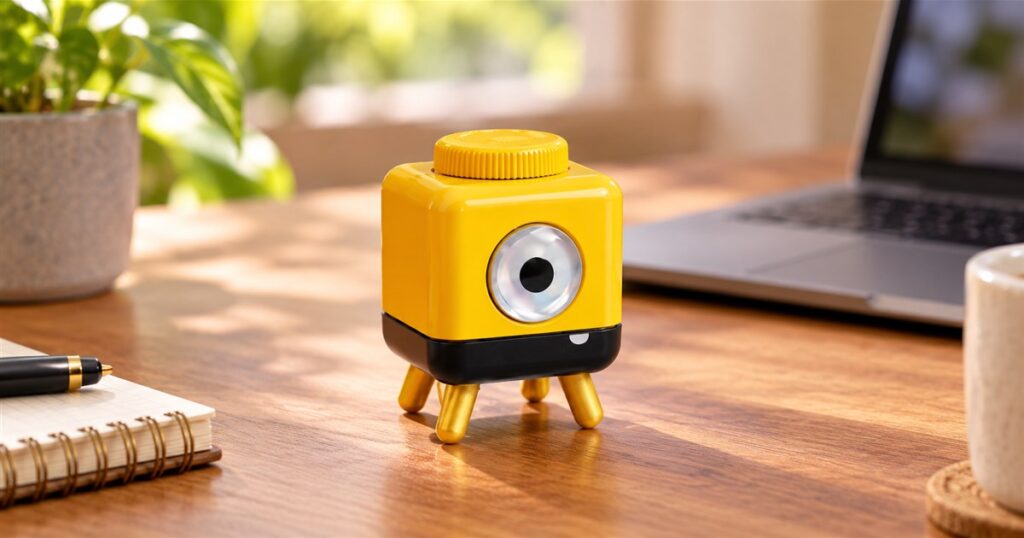
Your phone has seventeen ways to interrupt you, and somehow none of them feel like a favor. PalmBlock’s StepTimer takes a smaller, stranger approach: this little desk timer waits out your chosen interval, then physically walks. Your reminder to take a break now has legs. Management has never looked so easy to accidentally name Gerald.
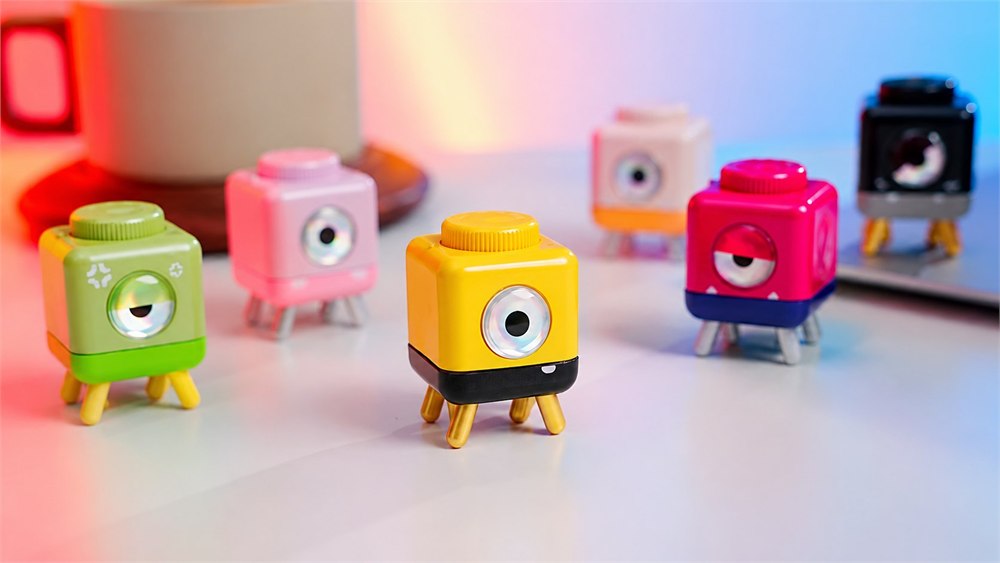
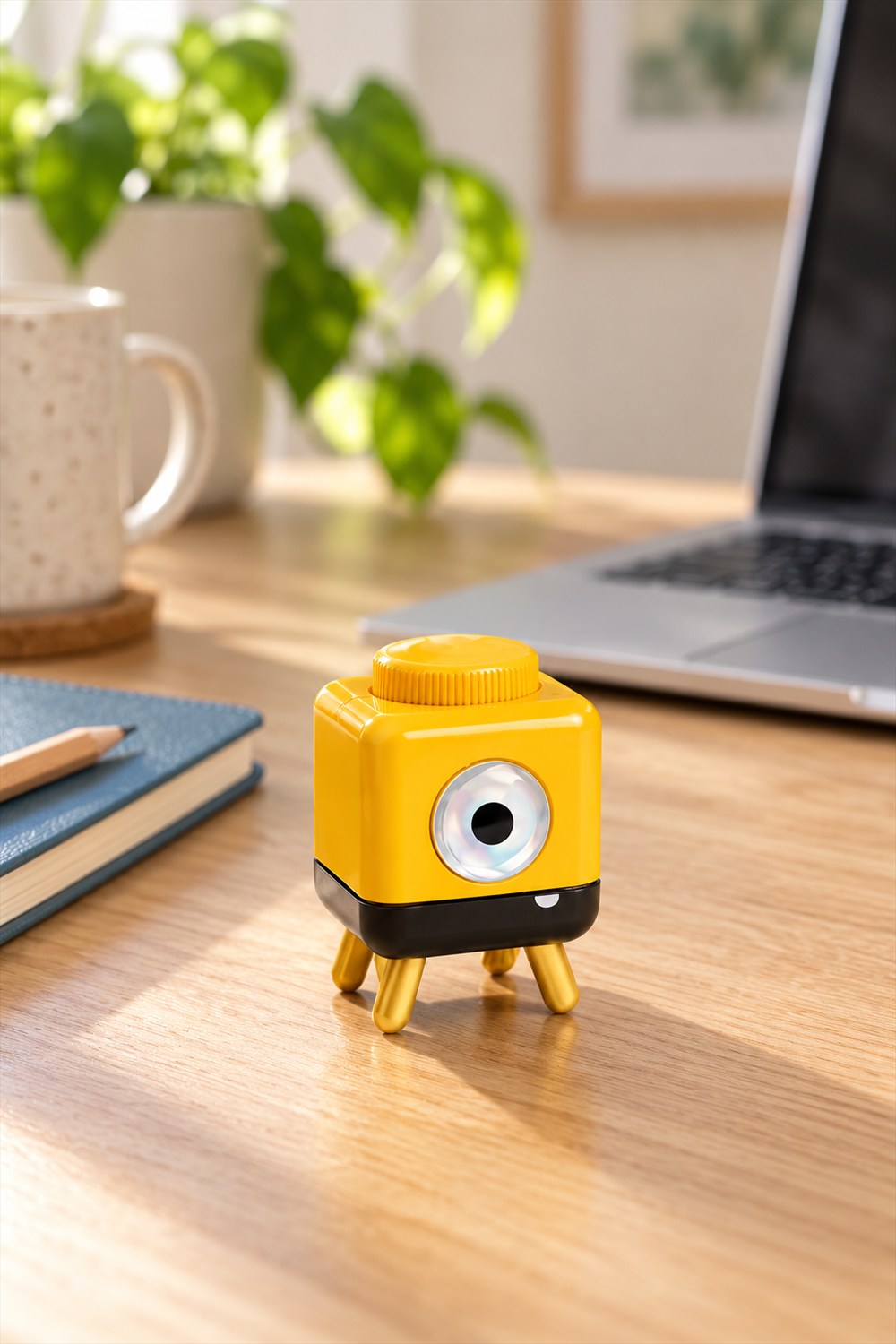
The palm-sized character is a timer dressed as a tiny one-eyed desk creature. Instead of another illuminated rectangle competing for your attention, you get a colorful body, a dial on top, and a set of stubby feet. It looks ready to supervise a very small factory, possibly one that manufactures paper clips.
PalmBlock describes a deliberately simple routine. Twist to choose a duration, put the timer down, and get on with whatever needs doing. When the interval ends, movement replaces the usual beep. That is the whole appeal: a physical reminder you can see, without having to invite your phone and all its unrelated opinions into the task.
A timer that takes the hint and leaves its spot
Most timers finish their work by making a noise at you. This one gets moving. There is something pleasingly literal about a break reminder that demonstrates the concept before you have agreed to participate. You have been staring at the same spreadsheet for a while; the small yellow supervisor would like everyone to consider using their legs.
That does not mean you should expect it to patrol the house, follow you around, or navigate obstacles. The attraction is the walking signal at the end of a timed session. Give it a clear, visible patch of surface, keep it away from edges, and think desk companion rather than miniature autonomous butler. It is not bringing you coffee. We all have limits.
Related posts:
 This Hourglass Time-Out Stool Has An Integrated Sand Timer For Perfectly Timed Time-Outs
 This Wall Mounted Birthday Calendar Is The Perfect Way To Remember All of Your Family’s Birthdays
 Penguin Tea Timer Gets Perfect Tea Infusion Every-Time
 This Bubble Window For Your Fence Allows Your Dogs To Peek To The Other Side

A visual cue also has a different trade-off from an audible alarm. If you are looking elsewhere, leave the room, or need a reminder you can hear from across the house, movement may not suit the job. The nicest place for this idea is somewhere you will actually notice it, such as beside your keyboard or near the book you are trying to finish.
Five choices, fewer excuses
The timer offers five preset intervals: 5, 10, 15, 25, and 45 minutes. That makes it a good fit for the kind of everyday task that benefits from a boundary, rather than a complicated setup. You are choosing a manageable stretch of time, not filing a flight plan.
The 25-minute setting is an obvious match for a focused work session. A shorter interval could mark a quick tidy, a pause between tasks, or the moment you stop reorganizing your pens and start the actual project. Forty-five minutes gives you a longer run before your desk creature files its walking complaint.
- Pick a short interval for a small chore you keep putting off.
- Use a longer session to give one task your attention without checking a phone clock.
- Place the timer where its movement will be easy to see.
- Keep a clear area around it rather than treating a crowded shelf as a racetrack.
- Choose a different alarm when the job requires an audible signal or an exact duration outside the presets.
There is no app, account, or screen in the advertised setup. For anyone who has ever opened a phone to set a timer and emerged twenty minutes later with strong opinions about a stranger’s kitchen renovation, that is a feature with considerable emotional weight.
| Detail | What to expect |
|---|---|
| Timer selection | Twist control |
| Preset durations | 5, 10, 15, 25, or 45 minutes |
| End-of-session cue | Walking rather than a beep |
| Setup | No app or account |
| Appearance | Six color options shown |
| Accessory ideas | Hats, magnetic ears, planters, and a travel shell |
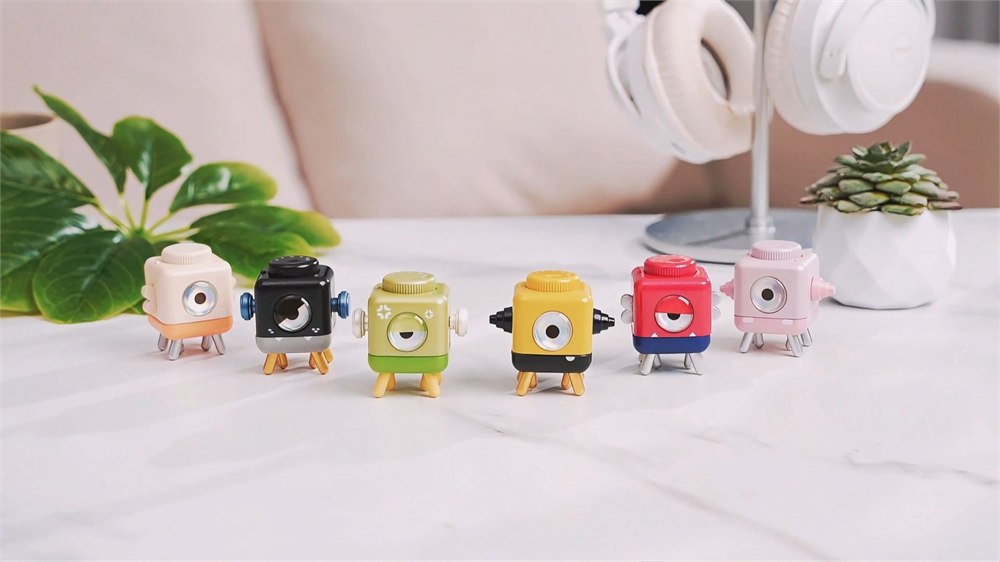
The office dress code now includes tiny hats
StepTimer’s character design does a lot of the heavy lifting. Its big single eye gives it the expression of something that has just noticed your browser tabs. The squat shape and little legs keep it firmly in desk-pet territory, even before accessories enter the picture. This is functional equipment with an unusually strong chance of receiving a birthday.
PalmBlock shows six colors, so the timer does not have to match the yellow version. The lineup has the energy of a very small department photo: everyone has the same job, but clearly different feelings about the meeting. A bright color also helps the little object stand out from the usual landscape of cables, notebooks, and cold coffee.
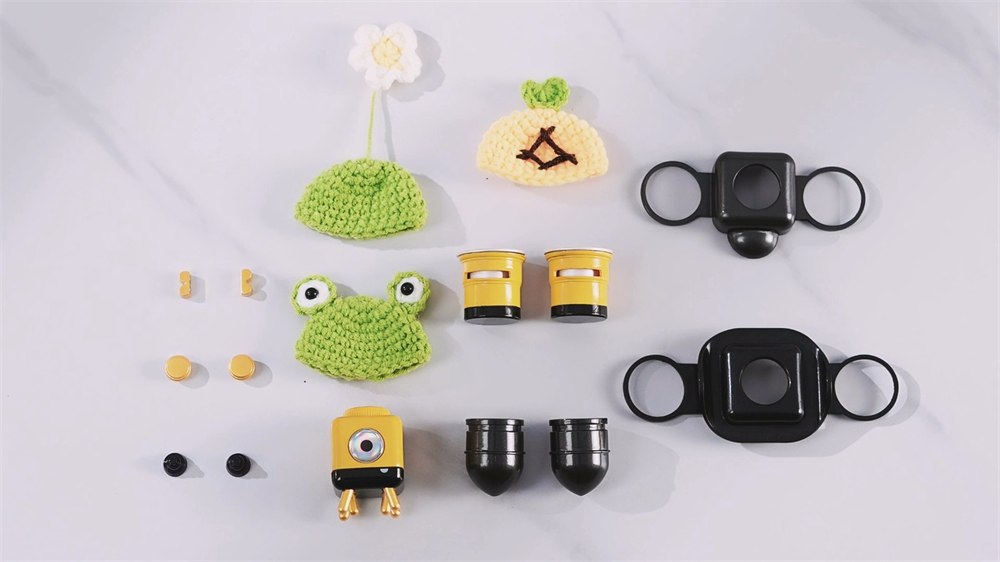
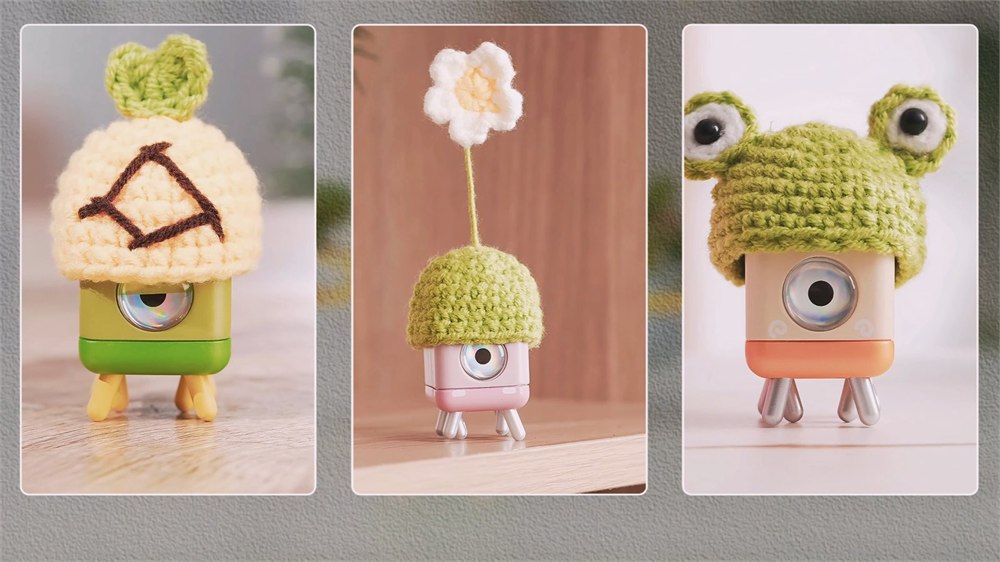
Then there is the wardrobe. Magnetic ears and small hats let the timer lean harder into its character role. A travel shell appears among the accessories, too. Before choosing an offer, check exactly which extras belong to that package. A family photo of accessories is not a promise that every item comes in the box.
The hats are particularly difficult to regard with appropriate professional distance. PalmBlock describes them as hand-knit. Somewhere, someone applied actual knitting patience to the problem of a timer having a cold-looking head. That is either a delightful use of human ingenuity or a sign that the office gift exchange has finally become competitive.
It can also moonlight as desk greenery
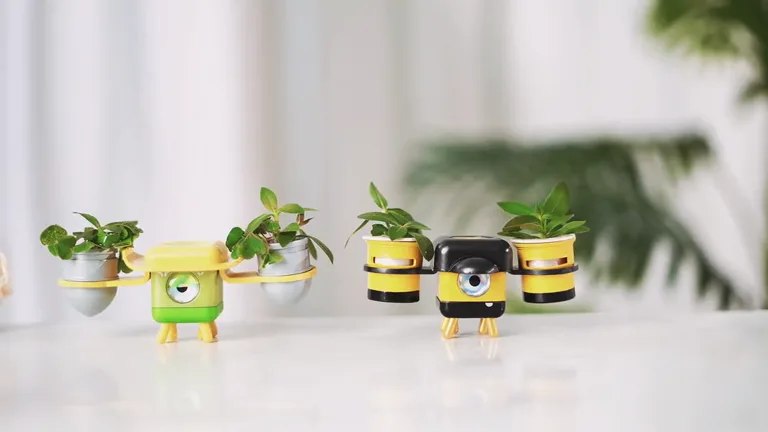
The planter accessory gives the character another role between sessions. The shown setup places small pots on either side, turning a timer into the sort of tiny plant attendant you might appoint without checking any references. It is an amusing way to combine two desk habits: collecting little objects and insisting the workspace needs more greenery.
Think of that as an accessory arrangement, not a claim that the timer waters plants or takes care of them. You still have the horticultural responsibilities. The miniature employee simply supplies the presentation, which, to be fair, is often the part that earns the most compliments.
All of this makes StepTimer an appealing idea for someone who enjoys tactile objects and wants a visible boundary around focused work. It is less compelling if you need a detailed countdown display, arbitrary minute-by-minute settings, or an alarm that follows you into the next room. Cute equipment still has to fit the job. Gerald cannot solve every department’s problems.
Images: PalmBlock.
- Palm-sized walking desk timer with a single-eye character design.
- Twist to select one of five preset durations.
- Walking provides the end-of-session reminder instead of a beep.
- No app, account, or screen required for the advertised setup.
- Six colors and a range of character accessories are shown.
- Check package contents and delivery terms before choosing a launch offer.
PalmBlock’s launch page advertises a limited $32 Super Early Bird offer against a $59 MSRP and lists an October 13, 2026 Kickstarter launch. At the time of writing, that page still presents a signup form. Treat those as advertised launch terms, and check the current campaign for availability, shipping costs, included accessories, and delivery estimates before backing. Your future desk supervisor may be adorable, but it still needs to arrive before it can tell you to stand up.
| Pros | Cons |
|---|---|
| A playful physical reminder to take a break | A visual cue can be missed when you look away |
| Simple twist-based selection | Five presets rather than arbitrary durations |
| No app or account in the advertised setup | No screen-based countdown |
| Colorful character and accessory options | Package contents need checking |
| Planter attachment adds a second desk role | Plants still need ordinary care |
| Distinctive gift for a desk-toy enthusiast | Launch availability and delivery require confirmation |
Save this find.
Thank yourself later.
Your next great gift idea. Your someday space. Your collection of wonderfully weird things.
Save to PinterestPick a board. Keep the inspiration.
This Walking Desk Timer Takes a Stroll When Your Time Is Up
Where to find This Walking Desk Timer Takes a Stroll When Your Time Is Up
OddityMall may earn a commission from qualifying purchases at no extra cost to you.
Related posts:
This Hourglass Time-Out Stool Has An Integrated Sand Timer For Perfectly Timed Time-Outs
This Wall Mounted Birthday Calendar Is The Perfect Way To Remember All of Your Family’s Birthdays
Penguin Tea Timer Gets Perfect Tea Infusion Every-Time
This Bubble Window For Your Fence Allows Your Dogs To Peek To The Other Side
