
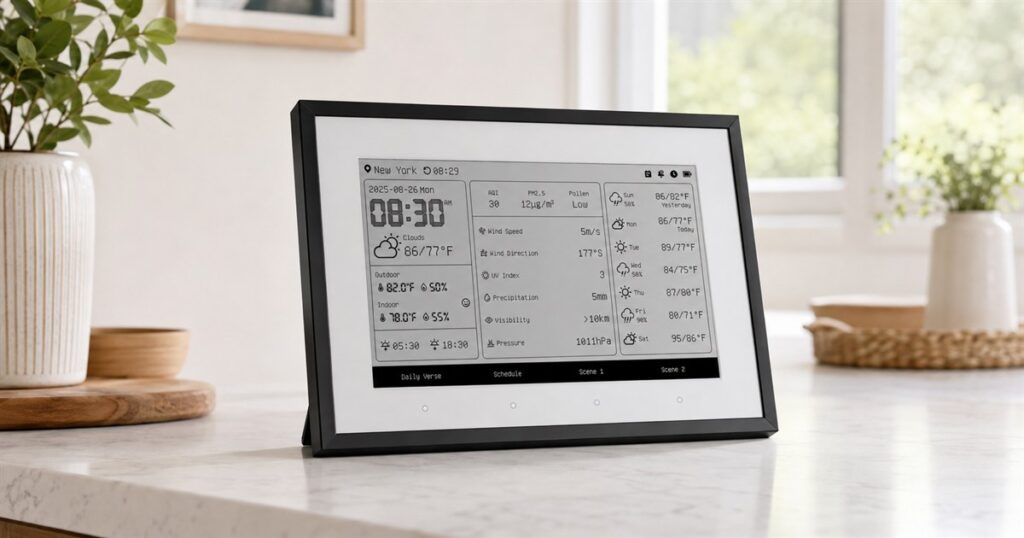
Every family has one sacred command center, and it is usually a pile of mail, a dying pen, and one sticky note that says “call dentist” from a previous civilization. The SwitchBot E-Ink Home Dashboard is a 7.5-inch paper-style smart weather station and family calendar that tries to turn that domestic rubble into something calm enough to hang on the wall without making your kitchen look like an airport departure board.
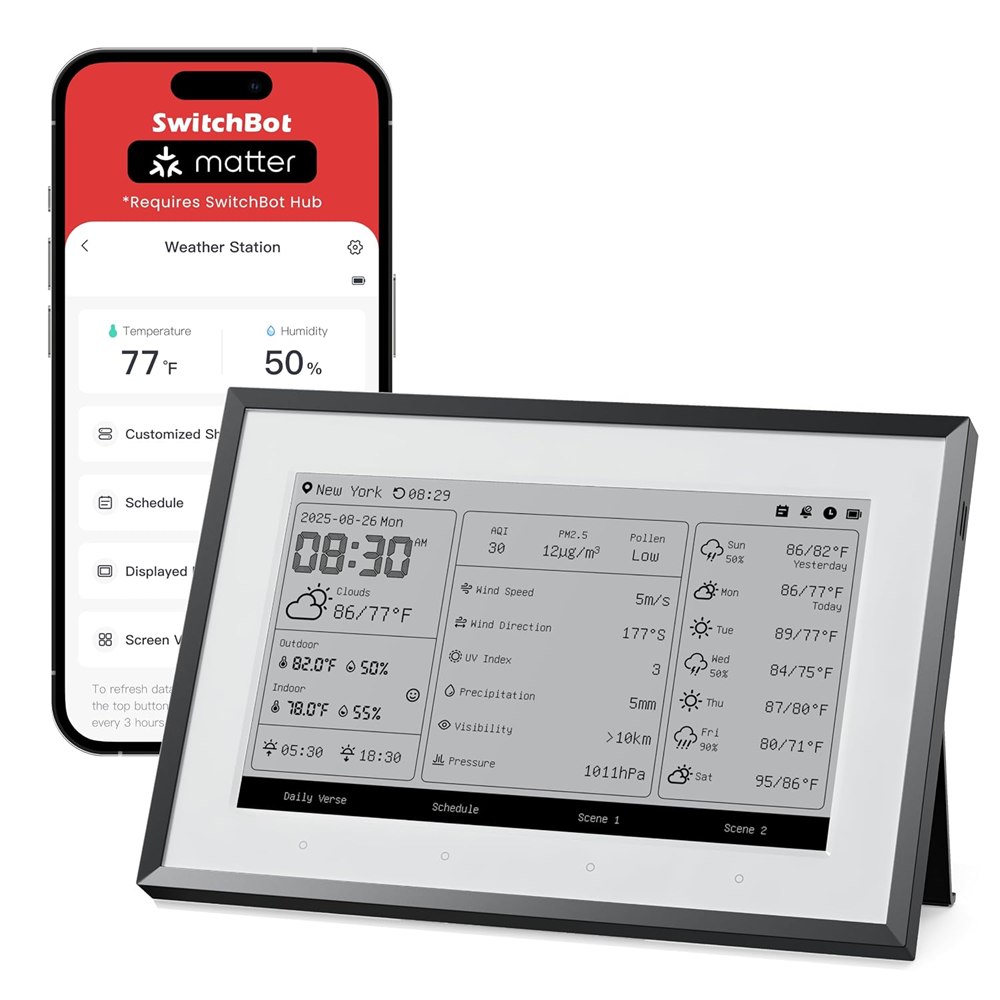
The basic idea is wonderfully specific: take the stuff households check constantly, put it on a low-power E-Ink screen, and stop asking everyone to unlock a phone just to learn whether soccer practice, a thunderstorm, or a forgotten grocery run is about to ruin the evening. SwitchBot sells it as an E-Ink Home Dashboard, WiFi Weather Station, and family calendar, which is a long name for a device that wants to be the household refrigerator door after it went to finishing school.
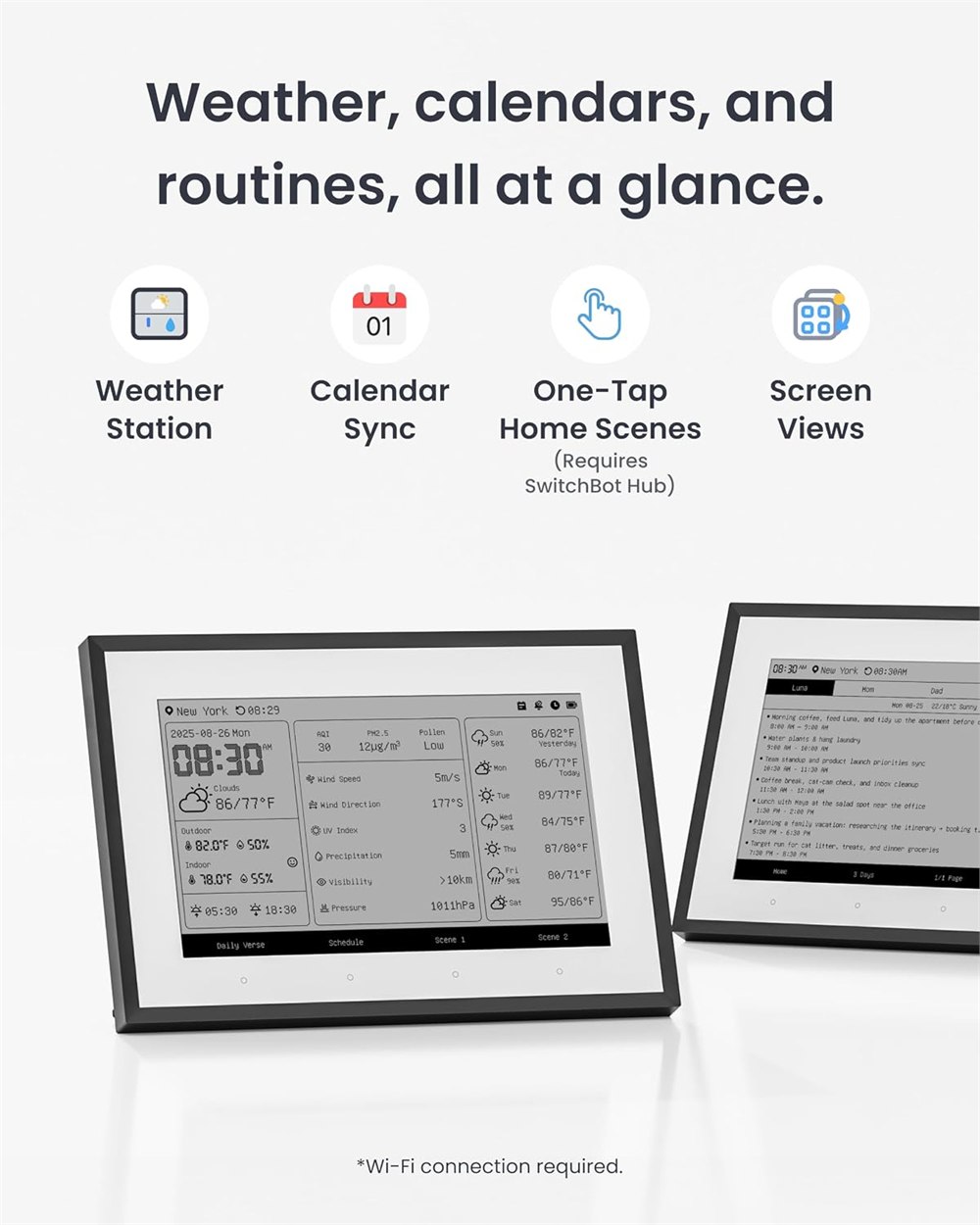
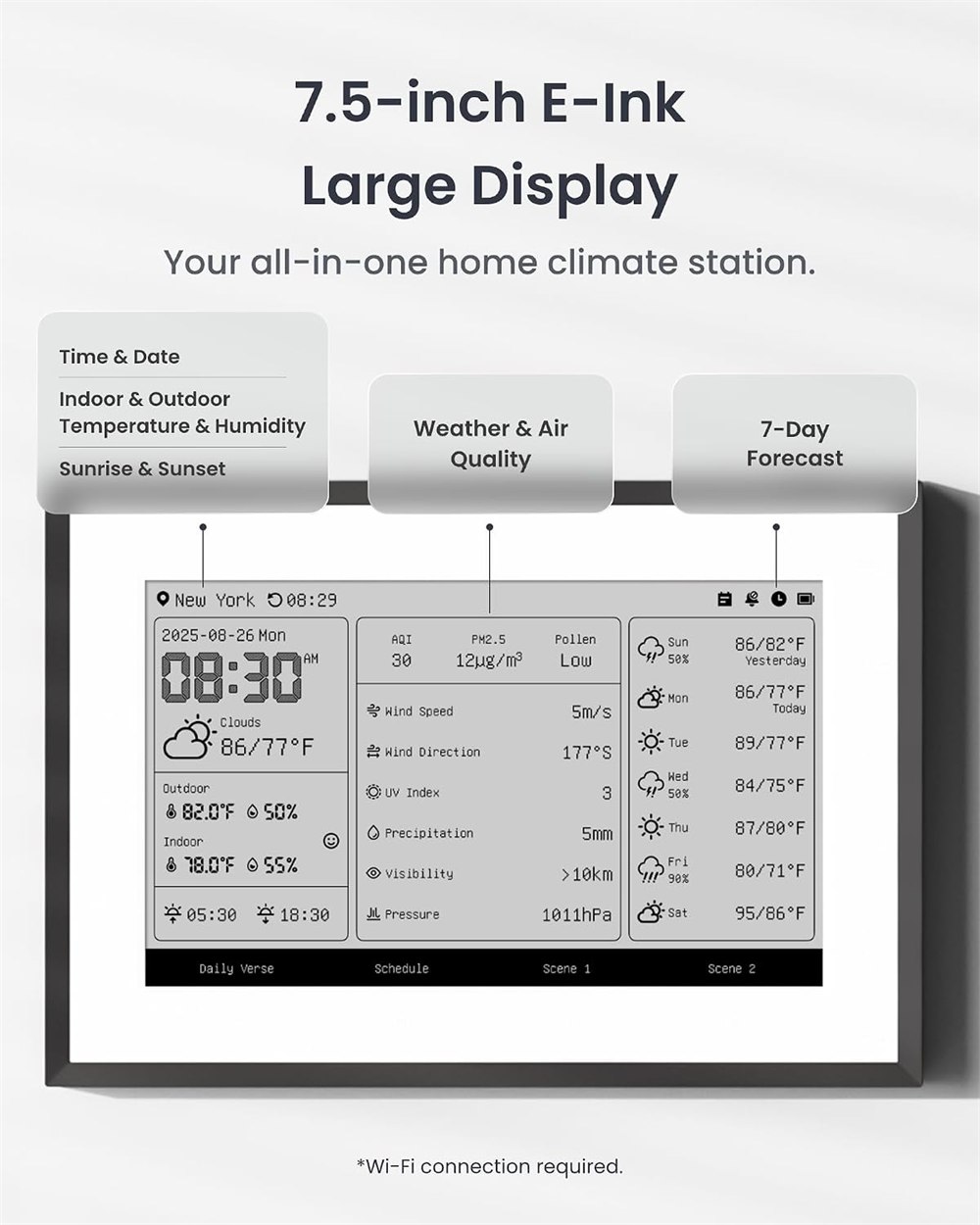
Because it uses E-Ink instead of a glowing LCD, the display looks more like a printed sheet than another tiny television begging for attention. That is the real charm here. Most smart displays behave like countertop billboards with clocks attached. This one is much quieter: weather, indoor and outdoor readings, calendar items, air quality info, date, time, sunrise and sunset details, and a set of SwitchBot scene controls arranged in tidy grayscale panels.
A Quiet Dashboard For Loud Households
The Home Dashboard is built around a 7.5-inch E-Ink display inside a framed rectangle with a white front and dark trim. It can sit on a counter with its stand or be mounted where everyone passes by. That makes it especially useful in the boring but critical zones of home life: the entryway, kitchen, mudroom, office nook, or anywhere a person might shout “what time are we leaving?” while holding one shoe.
SwitchBot says the weather screen can show indoor and outdoor temperature and humidity, weather information for today and surrounding days, a multi-day forecast, air quality, time and date, plus sunrise and sunset information. The Amazon listing describes Google, iCloud, and Outlook calendar support, while SwitchBot support material notes calendar syncing through calendar URLs and the device firmware’s calendar screen behavior. In plain human terms, it is trying to be the wall calendar, weather app, and “please remember the dentist” board in one place.
Related posts:
 This Wall Mounted Birthday Calendar Is The Perfect Way To Remember All of Your Family’s Birthdays
 This Die Hard Advent Calendar Is The Ultimate Way To Countdown To Christmas
 The SwitchBot Curtain Is a Robot That Automatically Opens Your Curtains
 This Tiny Home Robot Wants To Be Your Vacuum, Butler, Air Purifier Mule, And Tiny Rolling Intern
The device also has physical buttons along the frame. Some are for switching screen views, while two can be used as one-tap SwitchBot scenes when paired into the SwitchBot ecosystem. That could mean tapping a button to control a light, appliance, or other scene through a compatible SwitchBot setup. It does require the right SwitchBot hub for those broader smart-home tricks, so this is not secretly a universal command center that can boss around every device in your house by sheer confidence.
- It uses a 7.5-inch paper-like E-Ink display instead of a bright tablet screen.
- It can show weather, temperature, humidity, forecast, air quality, date, time, sunrise, and sunset information.
- It supports family-calendar style viewing with major calendar services listed by the seller.
- It includes physical scene buttons for SwitchBot smart-home actions when used with the right hub.
- It can sit on a counter or work as a wall-mounted household dashboard.
The Screen Is The Whole Personality
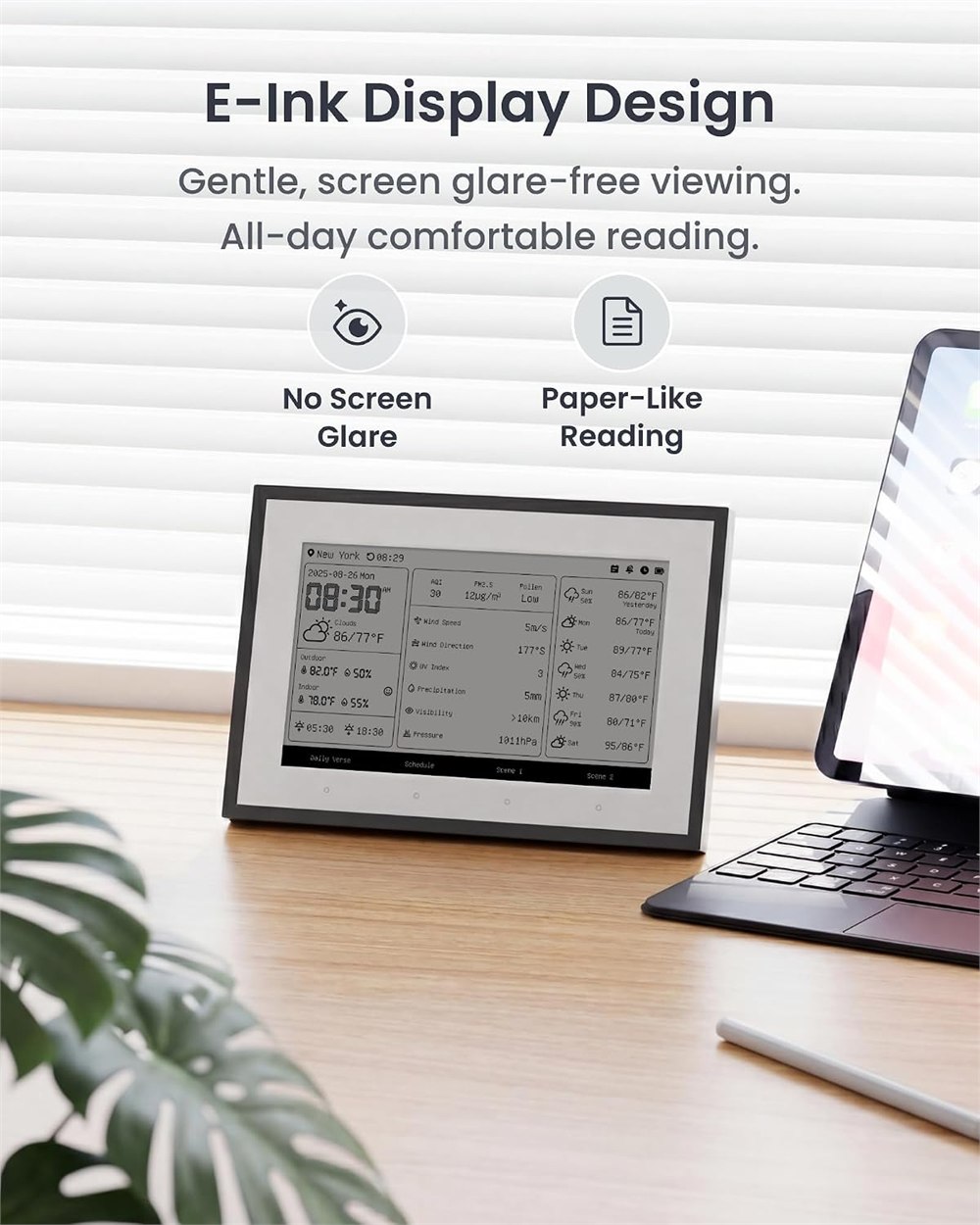
The best reason to care about this thing is the display. E-Ink is slow compared with a tablet, but that slowness is part of the deal. You are not buying this to watch videos, doom-scroll, or accidentally learn six upsetting headlines before breakfast. You are buying it because a static household dashboard should not need the emotional intensity of a casino sign.
SwitchBot’s own materials describe multiple theme views, including layouts for environmental data, daily overview, calendar, countdown, daily verse, and custom text. The support pages also describe weather information updates and calendar behavior, with weather data refreshing automatically at set intervals and calendar information handled through the device and app workflow. That means the Home Dashboard is less about constant interaction and more about passive visibility. It sits there, quietly judging the humidity.
| Feature | What It Means At Home |
|---|---|
| 7.5-inch E-Ink display | Readable, paper-like information without a glowing tablet vibe. |
| Weather and climate panels | At-a-glance indoor/outdoor readings, forecast, and air-quality style info. |
| Calendar viewing | Shared daily planning for meetings, school schedules, chores, and reminders. |
| Scene buttons | Two physical shortcuts for SwitchBot smart-home scenes with compatible hardware. |
| Battery-powered design | SwitchBot markets up to a year of battery life under its standard refresh behavior. |
The battery claim is another nice bit of household sanity. SwitchBot markets the Home Dashboard with up to one year of battery life, which makes sense for a display that is not constantly redrawing a bright color screen. There is also a USB-C charging route, so you can keep it topped up instead of turning the weekly family schedule into another device-maintenance ceremony.
Calendar Drama, But Neater
Shared calendars are supposed to solve scheduling chaos, but they often just move the chaos into five private rectangles owned by people who all swear they told everyone already. A visible calendar screen helps because it turns schedule awareness into a piece of furniture. You do not need to ask whether anyone saw the invite; the dashboard is sitting right there, making the answer everyone’s problem.
SwitchBot’s announcement says the calendar function supports one-way syncing with major calendar platforms including Google, iCloud, and Outlook, and the product materials talk about multiple personal calendars and event display. The exact experience will depend on the app setup, firmware, and how your household already handles calendar links, but the point is clear: it gives appointments a public place to live without asking a phone to become the family bulletin board.
The weather side is equally practical. It is not trying to replace a full meteorology app for people who enjoy radar maps and barometric pressure as a lifestyle. It is for the everyday glance: do we need jackets, will the backyard feel like soup, is the air quality weird, and should anyone be blamed for opening the windows. The screen’s panel-style layout suits that job because the information is broken into chunks instead of buried in a menu.
There are some realistic limitations. E-Ink is great for static information and gentle updates, not for fast animation. Smart-home control depends on the surrounding SwitchBot setup, and some functions require a SwitchBot Hub. Calendar syncing may involve app setup and compatible calendar links rather than magic. Also, if your household already ignores three calendars, a fourth visible calendar will not personally negotiate with your teenagers.
Who This Makes Sense For
This is most appealing for people who like smart-home organization but hate the look and feel of yet another bright display. It belongs in homes where someone wants the weather, room conditions, and shared schedule visible at a glance, especially near the kitchen, hallway, family room, or home office. It is also a neat option for anyone who has looked at DIY E-Ink dashboards and thought, correctly, that soldering should not be a prerequisite for knowing Tuesday’s appointments.
- Product: SwitchBot E-Ink Home Dashboard / WiFi Weather Station with family calendar.
- Display: 7.5-inch E-Ink screen with paper-like grayscale viewing.
- Weather info: indoor/outdoor temperature and humidity, forecast, air quality, date, time, sunrise, and sunset details as listed by SwitchBot and sellers.
- Calendar support: Google, iCloud, and Outlook calendar syncing are listed in seller and announcement materials.
- Controls: two SwitchBot scene buttons are available when paired with compatible SwitchBot hub hardware.
- Power: rechargeable battery with SwitchBot marketing up to one year of use under its standard refresh behavior.
- Use cases: kitchen command center, entryway calendar, home office weather panel, or quiet smart-home scene controller.
The SwitchBot E-Ink Home Dashboard is listed on Amazon for about $84.99 at the time of this writeup, with the usual Amazon pricing mood swings possible. It is sold as a SwitchBot product, and the best plain-language search phrase for similar shopping is “e ink weather station.”
| Pros | Cons |
|---|---|
| Paper-like E-Ink screen is calmer than a bright smart display. | Not built for video, fast interaction, or colorful app-style dashboards. |
| Combines weather, room readings, calendar, and time in one visible place. | Calendar setup depends on supported services, app flow, and firmware behavior. |
| Physical scene buttons can make smart-home actions easier. | Scene control requires compatible SwitchBot hub hardware. |
| Countertop or wall placement makes it useful in shared household spaces. | The framed design may be too gadgety for very minimal decor. |
| Long battery-life claim fits the low-power display concept. | Frequent refresh needs may reduce the practical battery advantage. |
| Good fit for families, roommates, and schedule-heavy homes. | It will not fix people who refuse to look at calendars. |
Where to find This E-Ink Weather Station Turns Your Family Calendar Into a Quiet Home Dashboard
OddityMall may earn a commission from qualifying purchases at no extra cost to you.
Related posts:
This Wall Mounted Birthday Calendar Is The Perfect Way To Remember All of Your Family’s Birthdays
This Die Hard Advent Calendar Is The Ultimate Way To Countdown To Christmas
The SwitchBot Curtain Is a Robot That Automatically Opens Your Curtains
This Tiny Home Robot Wants To Be Your Vacuum, Butler, Air Purifier Mule, And Tiny Rolling Intern
